Jira Automation: Reassigning Issues After 4 Hours of Inactivity

In this article, I'll guide you through the process of creating an automation in Jira that reassigns issues after four hours of inactivity. This involves setting up custom fields and editing the issue workflow transition to include specific post functions.
Step 1: Create A Custom Fields
First, we need to create a custom fields name: Assigned Date Time - This field will store the date and time when the issue was first created or being assigned.
Step 2: Create A New Resolution Value
Next, we'll modify the issue workflow transition by adding two post functions:
- Update Assigned Date Time - Automatically set this field to the current date and time whenever an issue is assigned.
- Set Resolution to New Case - Automatically set the resolution to "New Case."
These steps will ensure that the current date and time are recorded and the correct status is applied when new the issue was first created or being assigned.
Step 3: Create An Automation
- Set trigger is scheduled and run every 5 minutes
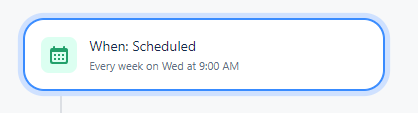
- Add a {{smart values}} condition

- {{smart values}} condition setting:
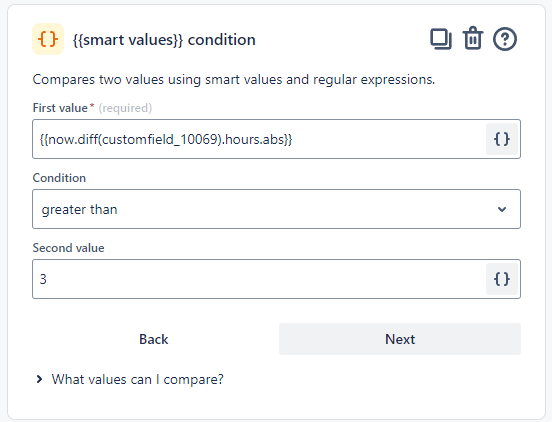
The First value field is to compute the difference in hours between the current time and the assigned date time.
{{now.diff(customfield_10069).hours.abs}}Assume my [Assigned Date Time] filed has smart value is 'customfield_10069'
How it works:
- Current Time (
now()): This function captures the current date and time. - Assigned Date Time (
customfield_10069): This custom field stores the date and time when the issue was assigned. ( For more information on lookup the smart value for custom field, refer to this article.) - Calculate Time Difference: Use Jira's smart values
.diff,.hoursto compute the difference in hours between the current time andcustomfield_10069. The calculation also ensures that the result is always a positive number, using the.absfunction to convert any negative differences to positive values.
This formula allows you to determine how many hours an issue has been inactive. If the calculated duration exceeds four hours, you can trigger an automation rule to reassign the issue.
Do you enjoy this blog post?